
Final Thoughts

Going into this course (my final graduate course!), I did not know what to expect. I did not anticipate the huge influence it would have in preparing for this upcoming school year. I have to admit, I knew the impact of using technology within the classroom, but I only utilized it on certain occasions. I realized I viewed technology as merely implementing interactive lessons using a Smart board, but I was amazed there are so many technology applications out there and I was not doing my students justice in engaging them and meeting their individual needs. 

The first take away from this course is the amount of availability of resources for educators. Each week I researched many applications, websites, and programs that I had no idea existed. It was exciting to learn a variety of implementations. I enjoyed learning from my classmates as well. I always tried to comment on a blog that included a different technology than mine, rather than familiarizing myself with only one. It was interesting to learn another’s perspective on how to incorporate it in the classroom.  The second takeaway is how rapidly technology is advancing and it is essential to incorporate into everyday instruction. Technology provides many authentic learning opportunities that would not have been possible a few years ago. My third takeaway is the goal of incorporating technology in education is to increase engagement for all students by differentiating needs of individuals. Instruction should be designed to create meaningful experiences by enhancing learning opportunities. 

My favorite project while taking this course was the video assignment. I had some previous experience using iMovie, but I was unsure of how to edit the video to include music, pictures, and other aspects. While creating the video, it taught me so much about myself. When I set on my graduate journey, I was unsure whether it was the right profession for me. I was passionate about Music Therapy, I could not imagine anything else. Now, I am passionate about including Music Therapy in classroom instruction by meeting individual needs academically, socially, emotionally, and physically. I enjoyed sharing how my passions all tie together in just a short clip. Although it may not be to this extent, the benefits of my students sharing about themselves through video production are great. I am excited to watch my students grow by increasing their self-esteem and independence while promoting self-expression. 

Prior to taking this course, I merely substituted technology for a traditional method. For example, I reinforced concepts through PowerPoints, provided videos on how to work out math problems, and we watched and listened to songs to memorize certain patterns in phonics or concepts in math. I am thankful I waited to take the course in educational technology in the summer so that I can design a plan on what I want to implement in just two short weeks before we are in full swing. There are many programs, technologies, and applications that I would love to include. One that I am most enthusiastic about is using assessments in technology (and I am not being sarcastic). As a resource teacher teaching multiple grades, I spent the majority of my time providing testing accommodations and modifying tests to suit individual needs. I had little time to informally assess understanding, which often made it difficult to track progress towards their IEP goals. With technologies such as Quizziz, Kahoot, Edpuzzle, and Formative all that is changed. I am able to design interactive and engaging quizzes appropriate to the students. They are easy to use, assessments are automatically graded, and can be printed to record in a gradebook or as documentation for meeting their goals. I also plan utilizing these applications as instructional tools in a group setting, review before major tests, and individual practice. I am excited to share my learning experiences with my colleagues and further develop my knowledge of incorporating technology in my instruction.

Assessments in Technology

The first assessment tool I chose to create an informal assessment with is Quizziz. Quizziz allows the teacher to create a fun and interactive assessment or find an existing one according to content. I am really excited about this tool because as a resource special education teacher, I spend a lot of time modifying and adapting tests or creating new tests specific to my students’ needs. With Quizziz, I was able to type the questions and customize the answer format. Students have the option to complete the assessment individually or in a competitive environment. The questions are set in a game format, which is highly motivating for my students. Another cool feature is that all assessments are automatically graded and can be printed in a test format to store in their cumulative folders. I chose to assess on adding and subtracting within story problems because many of my students struggled with this skill in the previous years. The questions are also read aloud, which is an accommodation required by their IEPs. No more reading 14 of the same test!

For my next assessment, I used Formative. Formative allows the teacher to create an interactive assessment by embedding videos and pictures and various answer formats including drawing, short answers, essays, and multiple choice in the free version. Formative provides live responses and tracks individual student performances, which is great for SPED! Assessments are able to be assigned for a variety of purposes. With my students, I see it being beneficial to use in a small group setting or as independent practice. For this assessment, I embedded a video as a review on identifying coins and their values. Then created five questions on counting mixed coins, which many of my students struggled with. With Formative, I am able to track their understanding of the concept and then modify my instruction accordingly.Both assessment tools were simple to use, which saves a lot of time. Assessments in technology is a game changer for my classroom and I can’t wait to implement them this year!

Check out my assessments below.

https://goformative.com/formatives/5d2cb614257e190fd73b8f1c

https://quizizz.com/admin/quiz/5d2bbfe3f9d165001be0e177

Audio Book Recording

For the next assignment, I chose to do an audio recording through Quicktime using my Mac. The Quicktime application is super easy to use. The user just presses record and saves the file! Quicktime also allows the user to record and edit videos and screen record. I cannot believe I haven’t taken advantage of this application sooner.

I chose to record an excerpt from National Geographic Explorer Spiders titled Tiny Lemur, Big Find. Many of my students lack sufficient background knowledge to understand their grade level material and lack resources at home to provide experiences. National Geographic Explorers provide scientific and historical content in a way elementary aged students can understand. With the audio recordings, my students are able to read and listen to the story on their own time while focusing on comprehension and content. Audio recordings are also a great accommodation for students with learning disabilities and Dyslexia. I plan to record a few of my AR books in my classroom to help my students be successful.

To avoid upgrading my blog and paying a fee, I uploaded the audio file using Padlet. I also included a picture of the story to use in the future with your students.

Made with Padlet

Enhancing Instruction in the Resource Room

When creating my lesson I decided to use Edpuzzle. Edpuzzle is especially designed for teachers for enhancing their instruction. Teachers can select videos created by other teachers or upload a video of their own. With Edpuzzle, the user is able to take any video and make it into a lesson. The program provides many options. Once the video is selected, the teacher may insert questions throughout to check for understanding, while Edpuzzle records the students’ responses and stores them in the gradebook. Teachers are also able to insert pictures, links, voice recordings, or select only a portion of the video to help further engage the students. Once the video is created, the teacher can assign the video to students via Google Classroom.

I am in the process of gathering materials to implement a “cool down corner” for my students with self-regulation difficulties to teach them how to stop and take a break. This social skills introductory lesson explains the importance of identifying and expressing your feelings while also providing instruction on how to use calming strategies. At the beginning of the clip, the students are asked to match emotions with an inserted clip to capture their attention. Next, I embedded questions to check for understanding. At the end, students are able to select strategies that help them the most so I am able to design the most effective center.

The biggest challenge when creating this lesson assignment was deciding which tool to use and what kind of lesson I wanted to create. I researched each tool, which was very time consuming! I decided on social skills because it targets a range of my students and not just one group.

I also had difficulty embedding my video in my blog. Edpuzzle would only allow me to embed the video in Google Sites and then embed the Google Sites address. My lesson can be viewed at

https://sites.google.com/s/1iDC3bHdNtsPVZiU5Nn-3um2kWWgOjzGp/p/1MBsDFHsFjtyyThQytT21GmDbV9V1MboV/edit?authuser=1

Featured

Video Production

For the video production assignment this week, I chose to make a video introducing myself to my parents and students for this upcoming school year. Since I am still considered a new teacher, I am excited to describe Music Therapy and how it led me in my journey in becoming a teacher.

When making my video, I decided to shoot a portion on my phone and a clip on my computer. I have used iMovie for editing movies before for simple projects, so I decided to continue with that application. Through the editing process, I had difficulty embedding music. I wanted to use music in my iTunes Library, however since the latest iTunes update, it is no longer compatible with iMovie. I decided to download a clip from bendsound.com, but it was also converted to a iTunes file. The only music I could use was what was already in iMovie. For my next video, I am now aware of my limitations so the process will go much smoother.

Overall, I enjoyed creating my video. I am excited to share all my passions in life in this short clip. I hope y’all enjoy!

https://youtu.be/g3IRW-Fk_jY

Internet Evolution in Education

While researching the evolving Internet stages, I used the program Padlet. Padlet helps the user organize their information all in one place. Padlet offers a variety of templets, which are all customizable. The user is able to upload videos, images, audio and chat with other users. Creating a Padlet was fun and easy to use, however the free version does not come with a tutorial of the site. This took a little time when customizing and making it my own. While I was gathering information about each Internet version, I realized that when using Padlet, the user can click anywhere on the project and search Google for images, video, audio, GIFs, and content without changing tabs. The user can simply click on an image, and it is embedded in your project. The user is able to find what they need in less time, without switching screens back and forth. Padlet also allows for the creator to share their board, which can be used as a discussion board in a classroom setting. Each student is able to create their own title and response. Other ways students and teachers can use Padlet include creating graphic organizers, timelines, organize lesson plans, and matching images to real life descriptions. Below, I provided my project and the link in using Padlet. I also found a great tutorial that describes how to use the program and provides great examples in the classroom.

Made with Padlet

https://padlet.com/

Featured

Learning Theories in Technology

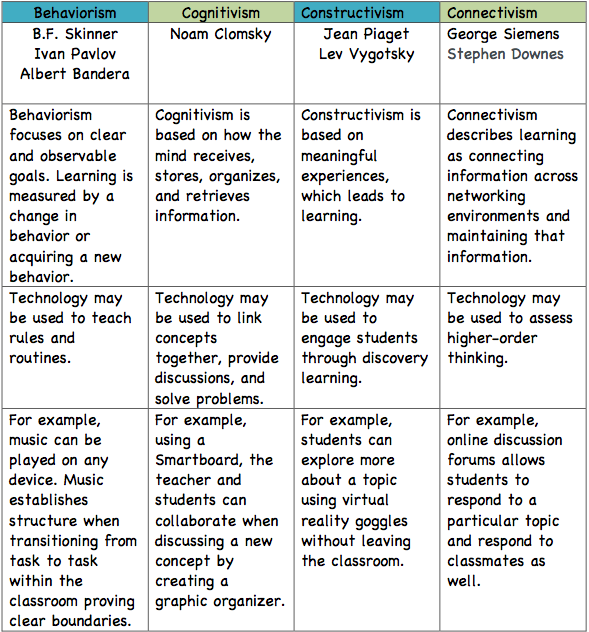
Before I created the Learning Theory Matrix, I had to dig a little deeper into each theory. It has been over a year since I took an educational psychology course, so I was a little rusty when explaining how each practice can be used through technology. After reading about each theory, I realized how much I already implement in the classroom on a daily basis. My instructional practices heavily consist of Behaviorism, Cognitivism, and Constructivism. As a special education teacher however, I struggled to think of ways I can apply Connectivism due to the nature of demonstrating higher order thinking and connecting across environments. I realized it does not have to be limited to writing, but I can assess their understanding through talk-to-text or through pictures. I am excited to take this course in the summer so I can start the school year with effective technology practices and programs and share with my fellow teachers.

http://www.sanfordbrown.edu/Student-Life/blog/March-2015/Four-Top-Learning-Theories-in-the-Age

https://joepgaston.wordpress.com/2017/02/16/rethinking-assessment-through-the-theory-of-connectivism/